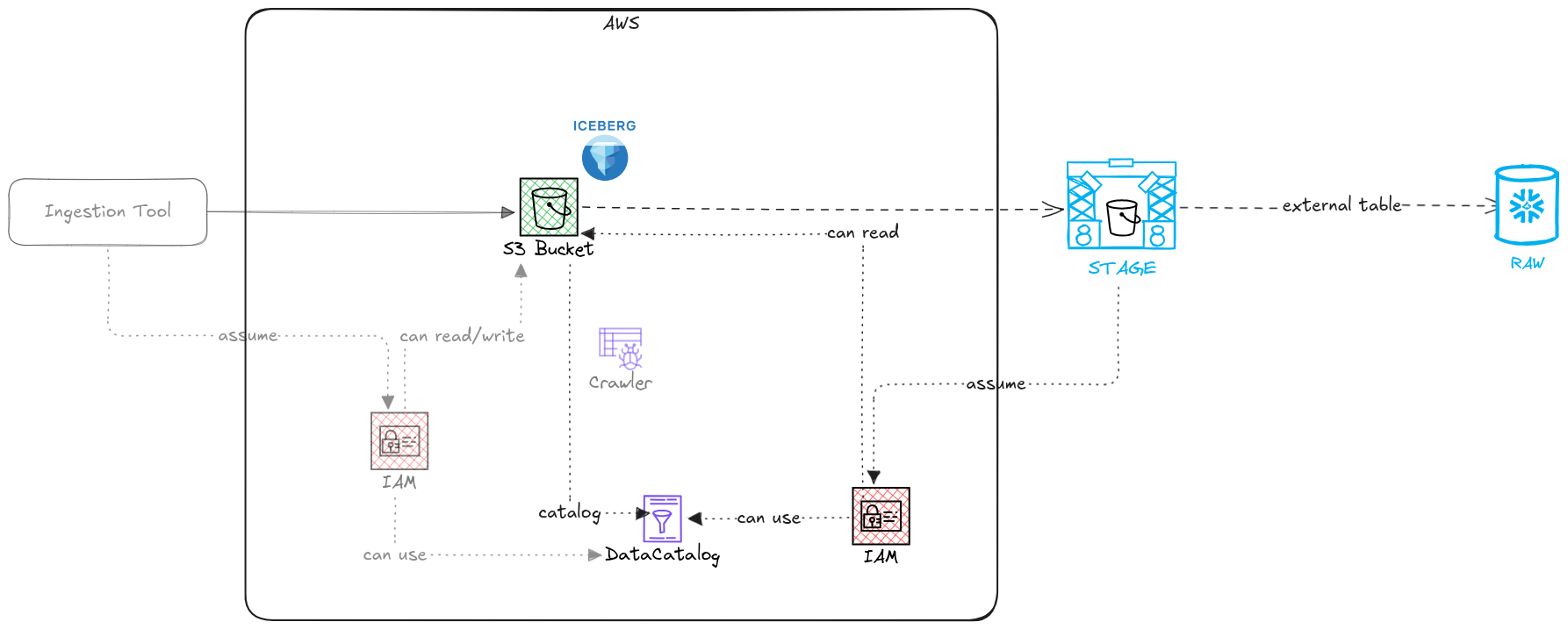
Your raw data is in S3, in Iceberg format, and Glue already knows about it. The goal is to make Snowflake read it from there, without copying anything. Three pieces need to be in place: an IAM role Snowflake can assume, an external volume pointing to the S3 location, and a catalog integration connecting Snowflake to Glue. Once those three exist, creating the table takes one statement. If your files are plain CSV with no catalog, the simpler version is here.
1. Create the IAM role
Snowflake needs an IAM role in your AWS account to read S3 files and query Glue metadata. Create the role with the following permission policy. The trust policy comes later, in step 3, after Snowflake gives you the values to put in it.
{
  "Version": "2012-10-17",
  "Statement": [
    {
      "Effect": "Allow",
      "Action": [
        "s3:GetObject",
        "s3:ListBucket",
        "s3:GetBucketLocation"
      ],
      "Resource": [
        "arn:aws:s3:::YOUR_BUCKET",
        "arn:aws:s3:::YOUR_BUCKET/*"
      ]
    },
    {
      "Effect": "Allow",
      "Action": [
        "glue:GetTable",
        "glue:GetDatabase",
        "glue:GetTableVersions",
        "glue:GetTableVersion"
      ],
      "Resource": [
        "arn:aws:glue:REGION:ACCOUNT_ID:catalog",
        "arn:aws:glue:REGION:ACCOUNT_ID:database/YOUR_DATABASE",
        "arn:aws:glue:REGION:ACCOUNT_ID:table/YOUR_DATABASE/*"
      ]
    }
  ]
}
2. Create the external volume in Snowflake
The external volume tells Snowflake where the S3 files are and which role to use when accessing them. Run this in Snowflake, then immediately describe the volume.
CREATE OR REPLACE EXTERNAL VOLUME iceberg_vol
  STORAGE_LOCATIONS = (
    (
      NAME                 = 'iceberg-s3-location'
      STORAGE_PROVIDER     = 'S3'
      STORAGE_BASE_URL     = 's3://YOUR_BUCKET/'
      STORAGE_AWS_ROLE_ARN = 'arn:aws:iam::ACCOUNT_ID:role/YOUR_ROLE'
    )
  );

DESC EXTERNAL VOLUME iceberg_vol;
The DESC output contains two values you need: STORAGE_AWS_IAM_USER_ARN and STORAGE_AWS_EXTERNAL_ID. Copy both.
3. Update the IAM trust policy
Take the two values from step 2 and add this trust relationship to the IAM role. The external ID is what prevents confused deputy attacks. Snowflake will reject the setup if it is missing.
{
  "Version": "2012-10-17",
  "Statement": [
    {
      "Effect": "Allow",
      "Principal": {
        "AWS": "STORAGE_AWS_IAM_USER_ARN"
      },
      "Action": "sts:AssumeRole",
      "Condition": {
        "StringEquals": {
          "sts:ExternalId": "STORAGE_AWS_EXTERNAL_ID"
        }
      }
    }
  ]
}
4. Create the catalog integration
This tells Snowflake which Glue database to use as the Iceberg catalog. CATALOG_NAMESPACE is your Glue database name. GLUE_CATALOG_ID is your numeric AWS account ID.
CREATE OR REPLACE CATALOG INTEGRATION glue_int
  CATALOG_SOURCE    = GLUE
  CATALOG_NAMESPACE = 'YOUR_GLUE_DATABASE'
  TABLE_FORMAT      = ICEBERG
  GLUE_AWS_ROLE_ARN = 'arn:aws:iam::ACCOUNT_ID:role/YOUR_ROLE'
  GLUE_CATALOG_ID   = 'ACCOUNT_ID'
  GLUE_REGION       = 'YOUR_REGION'
  ENABLED           = TRUE;
5. Create the Iceberg table
CATALOG_TABLE_NAME is the table name as Glue knows it. The CREATE statement just registers the table in Snowflake, nothing is moved or copied.
CREATE OR REPLACE ICEBERG TABLE raw.events
  CATALOG            = 'glue_int'
  EXTERNAL_VOLUME    = 'iceberg_vol'
  CATALOG_TABLE_NAME = 'events';

SELECT * FROM raw.events LIMIT 100;
Snowflake queries Glue for the metadata, reads the manifest files, reads the Parquet data in S3. Your other readers, Spark, Athena, anything else pointing at the same Glue table, keep working exactly as before.
Glue holds the catalog. S3 holds the files. Snowflake is just another reader.
Full script
-- Step 2: external volume
CREATE OR REPLACE EXTERNAL VOLUME iceberg_vol
  STORAGE_LOCATIONS = (
    (
      NAME                 = 'iceberg-s3-location'
      STORAGE_PROVIDER     = 'S3'
      STORAGE_BASE_URL     = 's3://YOUR_BUCKET/'
      STORAGE_AWS_ROLE_ARN = 'arn:aws:iam::ACCOUNT_ID:role/YOUR_ROLE'
    )
  );
DESC EXTERNAL VOLUME iceberg_vol;
– Copy STORAGE_AWS_IAM_USER_ARN and STORAGE_AWS_EXTERNAL_ID
– Update IAM trust policy before continuing
– Step 4: catalog integration
CREATE OR REPLACE CATALOG INTEGRATION glue_int
CATALOG_SOURCE    = GLUE
CATALOG_NAMESPACE = ‘YOUR_GLUE_DATABASE’
TABLE_FORMAT      = ICEBERG
GLUE_AWS_ROLE_ARN = ‘arn:aws:iam::ACCOUNT_ID:role/YOUR_ROLE’
GLUE_CATALOG_ID   = ‘ACCOUNT_ID’
GLUE_REGION       = ‘YOUR_REGION’
ENABLED           = TRUE;
– Step 5: Iceberg table
CREATE OR REPLACE ICEBERG TABLE raw.events
CATALOG            = ‘glue_int’
EXTERNAL_VOLUME    = ‘iceberg_vol’
CATALOG_TABLE_NAME = ’events';
SELECT * FROM raw.events LIMIT 100;